Tools That Replace Spreadsheets
Stop juggling spreadsheets, sticky notes, and email chains. Get a complete landlord platform that organizes your tenants, properties, applications, and maintenance in one professional system.
✓ No credit card required • ✓ Cancel anytime
Getting Started with OptimizedRentals
Create your free landlord account in under 5 minutes and start building verified rental data today. No credit card required to get started. Add your properties, invite tenants, and begin using professional landlord tools immediately.
1. Create Your Account
Sign up as a landlord with your email address. Verify your email and complete your profile. Takes less than 2 minutes to get access to the platform.
2. Add Your Properties
Enter your rental properties and units. Include addresses, rent amounts, and basic details. You can add more information as you go or bulk import data.
3. Start Using Tools
Explore all features immediately. Create application links, track maintenance, upload documents, and start building your verified rental data network.
Always Free Features
Building the future of rental screening together. These features are always free to use and search, forever:
- ✅ Tenant Reviews: Submit and search verified tenant reviews to build permanent rental histories
- ✅ Legal Decisions: Report and search legal decisions (evictions, tribunal rulings) to protect landlords
- ✅ Reference Requests: Send and respond to landlord reference requests at no cost
The more landlords who use these features, the more valuable the platform becomes for everyone. Help us build a fact-based screening system that replaces unreliable credit checks.
Property & Unit Management
Organize all your rental properties and units in one centralized dashboard. Track occupancy status, manage multiple properties, link leases to units, and maintain complete property records. From single units to large portfolios, keep everything organized and accessible.
Real Landlord Scenario
"I manage 6 properties with 15 units total. Before OptimizedRentals, I had separate spreadsheets for each property and was constantly confused about which tenant was in which unit. Now I see everything at a glance—occupancy status, lease dates, rent amounts, and tenant contacts. It's like having a command center for my portfolio." - Michael T., 15 units
Property Organization
Create property records with addresses, descriptions, and property types (house, apartment, condo). Add multiple units per property for multi-unit buildings. Organize by location, property type, or custom categories.
Unit Tracking
Track individual units with unit numbers, sizes, bedrooms, bathrooms, and rent amounts. See occupancy status at a glance (vacant, occupied, notice given). Link leases and tenants to specific units for complete organization.
Lease Management
Link leases to units to maintain occupancy records. See lease start and end dates, rent amounts, and tenant information all connected to each unit. Track lease renewals and expiration dates from the property dashboard.
Portfolio Overview
View your entire portfolio from a single dashboard. See total properties, units, occupancy rates, and monthly rent collected. Filter by property, status, or location to quickly find what you need.
Quick Start Tip
Start by adding your properties one at a time. For each property, add all units with basic info (unit number, bedrooms, bathrooms, rent amount). Once units are created, you can create leases and link tenants to specific units. The system automatically updates occupancy status when leases are finalized or expired.
Rent Payment Tracking & Management
Stop chasing late payments and manually updating spreadsheets. Set up rent schedules for each lease, acknowledge payments when received, automatically calculate late fees, and maintain a complete payment history for tax time. Track who's paid, who's late, and who's on time—all in one dashboard.
Real Landlord Scenario
"I used to spend 2 hours every month checking who paid rent and sending reminder texts. Now the system tracks everything automatically and sends reminders for me. I just check the dashboard for 5 minutes to see who's current and who needs follow-up." - Sarah M., 8 units
Rent Schedule Setup
Create payment schedules for each lease with rent amount, due dates, and payment frequency (monthly, bi-weekly, or weekly). Set grace periods and configure late fee policies (fixed, percentage, or daily).
Payment Acknowledgement
Acknowledge payments when received with payment date, amount, method (cash, check, transfer), and reference numbers. Track partial payments and maintain a complete record of all transactions.
Automated Late Fees
Configure late fee policies during schedule setup. Add late fees to overdue payments with automatic calculations based on your policy. Track late payment history to identify problematic tenants early.
Payment History & Reports
View complete payment history for each lease. Track payment status (pending, paid, late, partial, waived). Export payment data for tax reporting and identify trends in tenant payment behavior.
Quick Start Tip
After finalizing a lease, set up the rent schedule with your rent amount, payment frequency, and late fee policy. The system automatically generates payment records for the lease duration. As payments come in, acknowledge them with the date and method. Tenants see their payment history in their portal and get notifications when you acknowledge payments.
AI-Powered Tenant Management
Transform how you find and screen tenants. Share application links, get AI-powered insights on applications, and keep all tenant information organized in searchable profiles—no more hunting through emails or files.
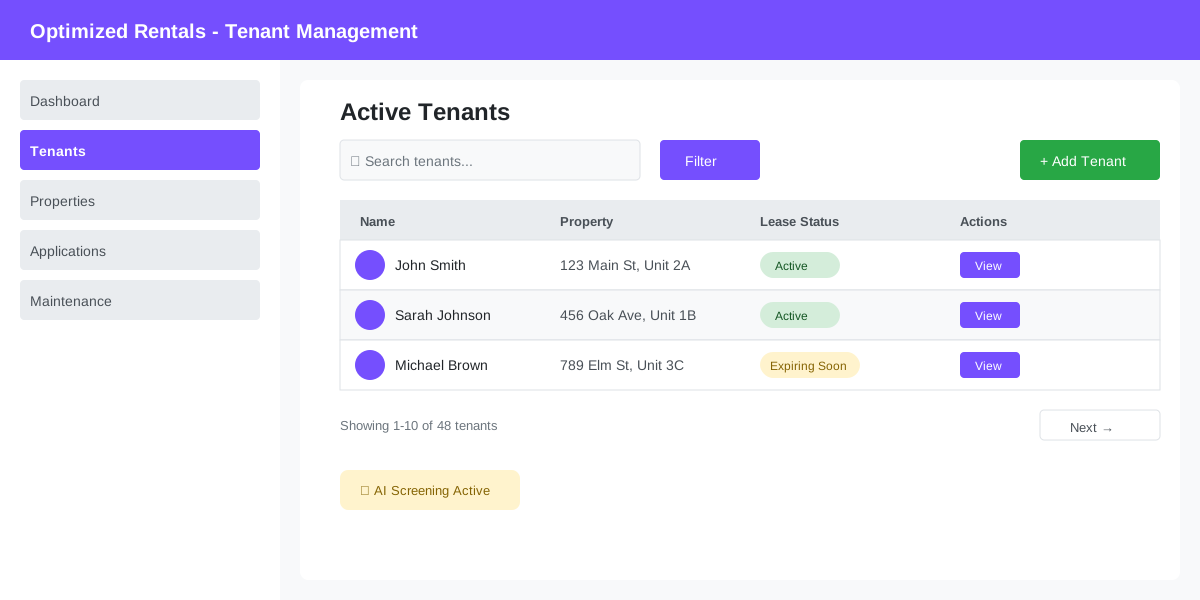
AI Screening Assistant
Get objective insights on applications. AI analyzes responses, flags inconsistencies, and highlights key information so you can make faster, more informed decisions.
Shareable Application Links
Create custom application links for each property. Share via text, email, or social media. Applications come straight to your dashboard—organized and ready to review.
Real Landlord Scenario
"I posted my vacancy on Facebook with an application link. Within 24 hours I had 12 completed applications in my dashboard, all organized with AI ratings. I reviewed them on my phone during lunch and selected 3 to interview. The whole process took less than an hour vs. the days it used to take managing paper applications." - Michael T., 15 properties
Quick Start Tip
Create your first property listing and generate an application link. Set your screening criteria (income requirements, rental history, etc.) so the AI knows what to look for. Share the link in your next vacancy posting.
Tenant Applications
One of our first and most refined features—the complete tenant application system that landlords love. Request applications via email, shareable links, or property listings. Tenants fill out comprehensive applications online, and everything arrives instantly in your organized dashboard. This intuitive workflow has been perfected through years of landlord feedback and serves as the easiest entry point to the platform. No learning curve—just simple, effective tenant screening from day one.
Why Landlords Love This Feature
"This was the first feature I used when I signed up, and I was immediately impressed. I sent an application request during a property showing by just entering the prospect's email on my phone. They completed it that same evening, and I had their full application—employment history, references, rental history—waiting in my dashboard the next morning. Zero paperwork, zero hassle. I've been using OptimizedRentals ever since because it just works." - Kevin D., 11 units (Customer testimonial)
Multiple Ways to Request
Send applications via direct email request, generate shareable links for social media or ads, or integrate with property listings. Whatever method you prefer, it takes seconds to get the application to prospective tenants.
Complete Applications
Tenants fill out comprehensive applications including personal information, employment history, rental history, references, and income details. Everything comes to you in a standardized, organized format.
Real-Time Status Tracking
See instantly when requests are sent, delivered, opened, and completed. Track which applicants haven't responded and send reminder notifications with one click. Know exactly where each application stands.
Instant Notifications
Get email and push notifications the moment a tenant submits their application. Review new applications immediately from any device—phone, tablet, or computer. Never miss an opportunity to secure a great tenant.
Property-Specific Requests
Link application requests to specific rental units or send general applications for your portfolio. Applications include the property details, making it clear to tenants which unit they're applying for.
Automatic Tenant Creation
When you send a request to a new applicant, the system automatically creates their tenant account and connects you. If they don't have an account yet, they're guided through a simple sign-up process as part of completing the application.
Built from Landlord Feedback
As one of our founding features, the tenant application system has been continuously refined based on thousands of landlord interactions. We've obsessed over every detail—from the mobile experience to the email notifications—to make this the smoothest possible entry point to digital property management.
The result? A system so intuitive that new landlords are collecting applications within minutes of signing up, with consistently positive feedback about how easy it is to use.
- ⭐ No learning curve: Start collecting applications immediately
- ⭐ Battle-tested: Refined through years of real-world use
- ⭐ Landlord-approved: Consistently praised for ease of use
- ⭐ Perfect starting point: The easiest way to begin your digital landlord journey
Get Started in 60 Seconds
This is the perfect feature to try first. After creating your free account, simply enter a prospective tenant's email address and click send. They'll receive a professional request to complete their application online. Within minutes, you'll see how easy modern tenant screening can be—no training required, no complicated setup. Just instant results that show you why this has been a favorite feature since day one.
Maintenance Request Tracking
End the chaos of maintenance calls and texts. Tenants submit requests with photos directly through the portal. You track every request from submission to completion with timestamped updates that protect you from "you never fixed it" claims.
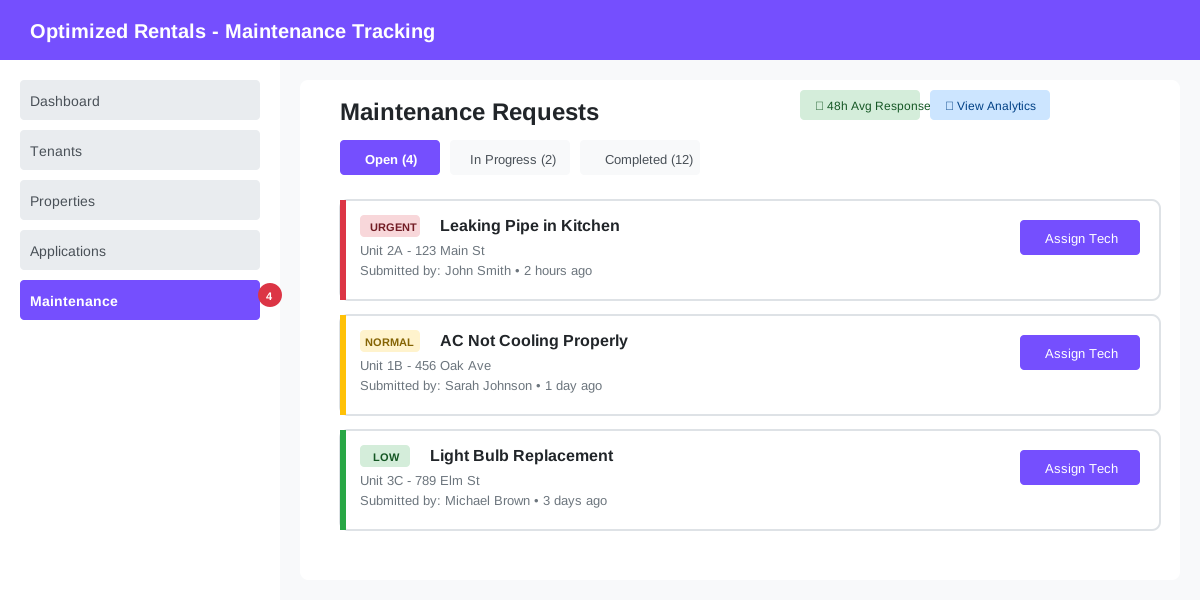
Real Landlord Scenario
"Before, I'd get maintenance texts at all hours. Now tenants submit requests through the app with photos. I can see exactly what's wrong, prioritize urgent issues, and assign my handyman—all without a single phone call. Plus, I have a complete record if there's ever a dispute." - Jennifer L., 12 units
Photo Documentation
Tenants attach photos to requests so you can see the problem before visiting. Build a visual record of every repair for insurance claims or security deposit disputes.
Complete Timeline
Every request is timestamped. Track when reported, when acknowledged, when fixed. Perfect for proving you responded promptly if a tenant ever claims neglect.
Quick Start Tip
Invite your tenants to the portal and show them how to submit maintenance requests. Set up email notifications so you're alerted immediately to urgent issues. Create response templates for common requests to save time.
Tenant Reviews & Ratings Always Free
Create a permanent, fact-based record of tenant behavior. Rate tenants on payment reliability, property care, communication, and more. Build verified rental data that helps you and other landlords screen tenants based on actual rental performance—not just credit scores and phone references. Submitting and searching tenant reviews is always free, forever.
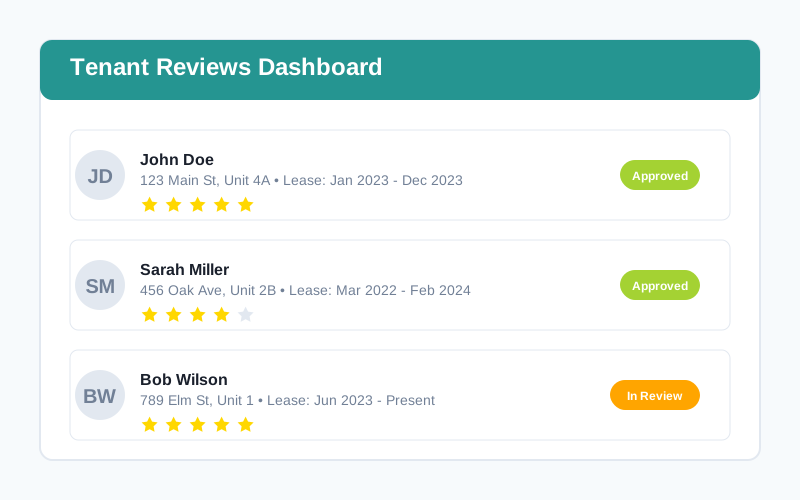
Real Landlord Scenario
"After a tenant moved out, I submitted a review rating their payment history (always on time), property condition (excellent), and communication (responsive). Six months later, that same tenant applied for another property and showed me their OptimizedRentals profile with my verified review. It's like a permanent rental résumé—way more reliable than a phone reference." - Lisa R., 7 units
Multi-Criteria Ratings
Rate tenants on payment history, property condition, communication, lease compliance, and neighbor relations. Provide an overall score with detailed feedback and upload supporting photos or documents.
Verified & Immutable
Reviews are permanently tied to verified landlord and tenant accounts. They can't be deleted or edited after submission, creating a trustworthy rental history. AI moderation ensures reviews are fact-based, not emotional rants.
Build Tenant Profiles
Tenants accumulate verified reviews from every landlord they've rented from. Over time, they build a complete rental history profile that they can share with future landlords—replacing unreliable phone references.
Network Effect
The more landlords who use tenant reviews, the more valuable the platform becomes. Help build a future where tenant screening is based on verified rental data, not just credit reports and gut feelings.
Quick Start Tip
After a tenant moves out (or even during the lease), create a tenant review. Rate them honestly across all categories and include specific examples. The review is moderated for appropriate language but remains permanent once approved. This builds a verified rental history that benefits both you and good tenants.
Automated Reference Requests Always Free
Stop playing phone tag with previous landlords. Send automated reference request emails directly to an applicant's previous landlords. Track responses, receive structured feedback, and make better screening decisions—all without lifting a phone. Sending and responding to reference requests is always free for all landlords.
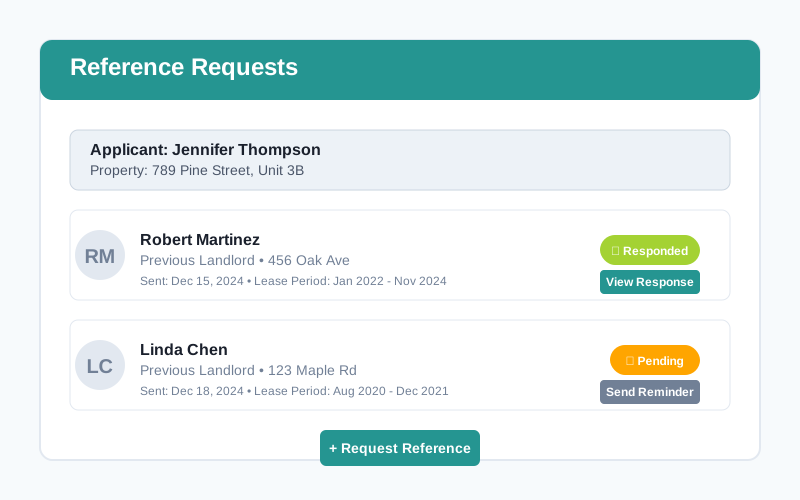
Real Landlord Scenario
"I used to spend hours trying to reach previous landlords by phone, often getting voicemail or no response. Now I click 'Request Reference' on the application, and the system automatically emails the previous landlord with a structured form. I get responses back in 24-48 hours, and it's all documented in the system. Saves me so much time and gives me better information." - Marcus D., 12 units
One-Click Requests
From any application, click to send a reference request to the applicant's previous landlords. The system automatically generates a professional email with a structured reference form that's easy for previous landlords to complete.
Structured Responses
Previous landlords receive a simple form asking about payment history, property condition, lease compliance, and whether they'd rent to the tenant again. Responses come back in a standardized format that's easy to compare across applicants.
Track Status
See which reference requests have been sent, which are pending, and which have been completed. Receive email notifications when a previous landlord submits their reference, so you can make timely decisions.
Documented History
All reference requests and responses are permanently stored with the application. If there's ever a question about your screening process, you have complete documentation of the references you checked.
Quick Start Tip
When reviewing applications, look for the "Request Reference" button next to each previous landlord listed. Click it to send an automated request. Most previous landlords respond within 24-48 hours. You can send reminders if needed, and the system tracks everything automatically.
Notice to Enter Management
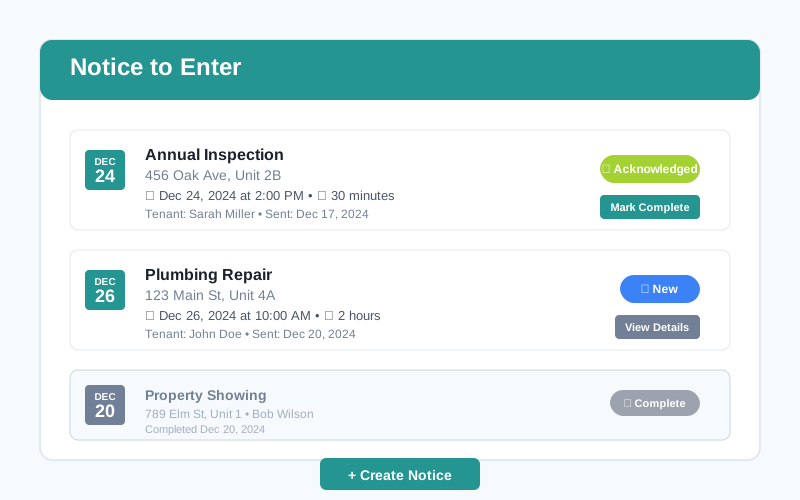
Send legally compliant notice-to-enter notifications when you need to access your rental property for inspections, repairs, or showings. Track tenant acknowledgments, maintain documentation for legal compliance, and avoid misunderstandings about property access.
Real Landlord Scenario
"I needed to show my rental unit to prospective tenants while it was still occupied. I sent a notice-to-enter through the system three days in advance, specifying the date, time, and reason. The tenant acknowledged it instantly, and I had proof of proper notice. During the showing, there were no surprises or conflicts—everything was professional and documented." - Patricia H., 5 units
Legally Compliant
Create notice-to-enter notifications that meet legal requirements in your jurisdiction. Specify entry date, time, duration, and reason. The system ensures you provide adequate notice (typically 24-48 hours) and maintains permanent records.
Instant Notifications
Tenants receive email and push notifications immediately when you send a notice-to-enter. They can view full details in their portal and acknowledge receipt with a single click, confirming they've been properly notified.
Track Acknowledgment
See exactly when tenants view and acknowledge your notice-to-enter. If they don't acknowledge, you still have proof you sent proper notice. The system timestamps everything for complete documentation.
Link to Maintenance
Create notice-to-enter directly from maintenance requests. When scheduling a repair, the system can automatically generate the proper notice, linking it to the work order for complete documentation.
Quick Start Tip
When you need to enter a property, go to the Notice to Enter section and create a new notice. Select the lease, specify the date and time, provide a reason (inspection, repair, showing), and add any additional details. The system handles the rest—sending notifications and tracking acknowledgments automatically.
Legal Decisions Database Always Free
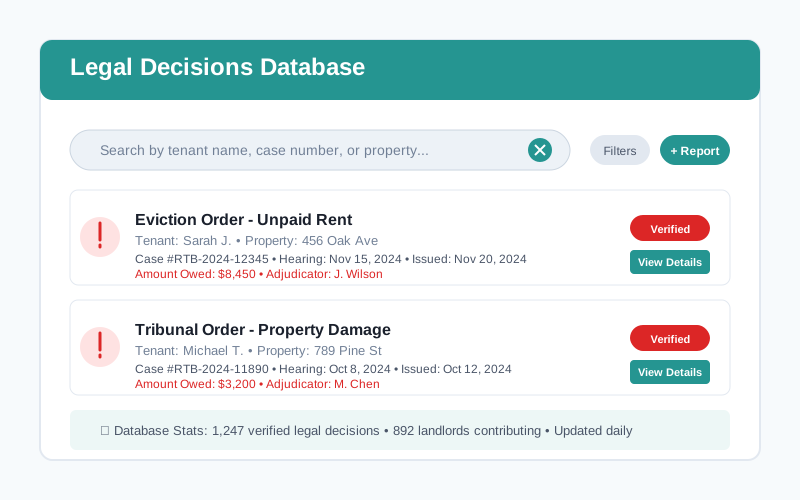
Report and search legal decisions including evictions, tribunal rulings, and court orders. Build a searchable database of problematic tenant behavior backed by legal documentation. Help protect other landlords by sharing verified legal outcomes. Reporting and searching legal decisions is always free to help build a safer rental community.
Real Landlord Scenario
"I had to go through a lengthy eviction process with a tenant who owed $8,000 in back rent. After winning at the tribunal, I reported the legal decision to OptimizedRentals with the case number and documents. Two months later, another landlord told me they found my report when screening that same person for a new rental. The verified legal record saved them from making a costly mistake." - Richard M., 9 units
Report Legal Outcomes
Submit tribunal decisions, eviction orders, and court rulings with case numbers, dates, and supporting documents. Include amounts owed, reasons for action, and final outcomes to build a comprehensive record.
Search Before Renting
Search the database by tenant name before accepting applications. See if applicants have legal judgments, evictions, or unpaid rent orders. Make informed decisions backed by verified legal documentation.
Verified Documentation
All submissions are reviewed and verified with supporting legal documents. Reports include case numbers, adjudicator names, hearing dates, and final orders—creating a permanent, verified record.
Community Protection
By sharing legal decisions, you help protect the entire landlord community. Build a network where problematic tenants with verified legal issues can be identified before causing more damage.
Quick Start Tip
After winning a legal case (eviction, tribunal order, unpaid rent judgment), take 5 minutes to report it. Upload the decision document, enter the case details, and submit for verification. Your contribution helps other landlords avoid the same problems you experienced.
Digital Document Management & Upload
Upload and store leases, inspection reports, photos, receipts, and notices in secure cloud storage. Organize documents by property or unit, share files with tenants securely, and find any document in seconds with tags and filters. Never dig through filing cabinets or email threads again. Perfect for tax time or legal situations.
Real Landlord Scenario
"My accountant asked for expense receipts from 8 months ago. In the past, I'd panic and spend hours searching. This time, I logged in, filtered by 'receipts' and the property name, and had everything emailed to her in 2 minutes. Game changer at tax time." - Robert K., 6 units
Easy Document Upload
Drag and drop or click to upload PDFs, images, Word docs, and Excel files. Supports all common file types. Add tags and descriptions for easy searching later.
Organized Storage
Keep private landlord documents separate from unit-specific files. Share lease documents with tenants through the portal. Everything organized and accessible from anywhere.
Secure & Backed Up
Bank-level encryption protects your documents. Automatic cloud backup means you'll never lose important files. Download anytime from any device.
Private Document Library
Store general landlord documents (insurance policies, tax records, vendor contracts) and unit-specific files (inspection photos, repair invoices, warranties) privately. Only you can access these.
Shared Lease Documents
Upload signed leases, addendums, notices, and other documents to share with tenants. Both parties can upload and access shared files, with full notifications when documents are added or updated.
Quick Start Tip
Start by uploading your current leases to the shared lease document area. Add unit photos and inspection reports to your private document library. Going forward, snap photos of receipts and upload them immediately with tags—it takes 30 seconds and saves hours at tax time.
Reporting & Analytics
Get instant reports on income, expenses, occupancy, and maintenance trends. Export data for your accountant or lender. Make data-driven decisions about rent increases, property improvements, or portfolio expansion.
Real Landlord Scenario
"I was considering raising rent but wasn't sure if my units were competitively priced. The vacancy rate report showed my average turnover was 30% lower than market average, meaning my rents were fair and my tenants were happy. I kept rates steady and maintained great tenants." - David P., 10 units
Income & Expense Reports
See monthly/yearly income vs. expenses by property. Track your actual ROI. Export to Excel or PDF for tax preparation or refinancing applications.
Occupancy & Vacancy Tracking
Monitor which units are occupied, vacant, or coming up for renewal. Track average days vacant to identify problem units and improve marketing.
Quick Start Tip
Run your first income/expense report to see current profitability. Set up monthly reports to be emailed automatically so you always know where you stand financially.
What's Coming Next
We're continuously building tools that save you more time and make landlording easier.
Automated Rent Collection
Accept credit cards, ACH transfers, and digital payments directly through the platform. Automatic payment reminders, late fee calculations, and instant deposit to your bank account.
Smart Lease Generation
Generate state-specific lease agreements in minutes. Fill in tenant and property details once, and the system auto-populates professional lease documents ready for e-signature.
Vendor Marketplace
Connect with vetted contractors, handymen, and property service providers in your area. Get quotes, schedule work, and pay vendors directly through the platform with built-in tracking.
Mobile App Launch
Manage your properties on the go with native iOS and Android apps. Get push notifications for urgent maintenance, review applications from your phone, and communicate with tenants anywhere.
Have a feature request? We listen to our landlords.
Share Your IdeasCommon Questions
Everything you need to know about getting started with Optimized Rentals.
What Landlords Are Saying
Real experiences from landlords who replaced spreadsheets with smart tools.
"I went from spending hours on spreadsheets to managing everything in minutes. The application tracking alone saved me countless hours. Best investment I've made for my rental business."
Sarah M.
Owner of 8 rental units
"The AI tenant screening is incredible. I can review 10 applications in the time it used to take me to read 1. And I'm making better decisions because the AI catches things I might have missed."
Michael T.
Portfolio of 15 properties
"As a first-time landlord, I was overwhelmed. This platform gave me structure and confidence. The maintenance tracking and document storage have been absolute lifesavers."
Jennifer L.
New landlord, 2 units
Read more success stories and landlord tips:
Visit Our BlogReady to Replace Your Spreadsheets?
Start your 30-day free trial today. No credit card required. Cancel anytime. Join hundreds of landlords who've already made the switch.
Start Free Trial See Us In The NewsQuestions? Read our FAQ or contact us.